Những điểm chính
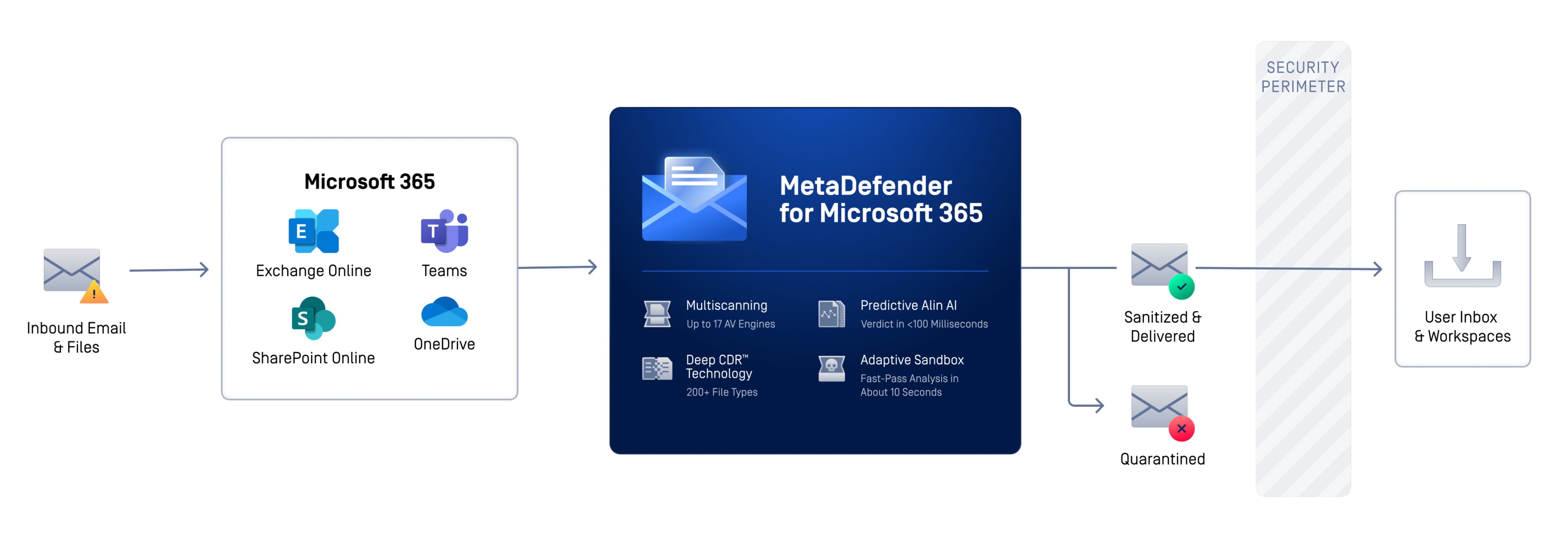
- Protection now follows files beyond the inbox: MetaDefender™ for Microsoft 365 covers email attachments in Exchange Online and supported files shared across Teams, SharePoint Online, and OneDrive.
- Inspection starts when collaboration files enter the tenant: Files uploaded directly to SharePoint Online or OneDrive, or shared through Teams, are scanned, sanitized, and sandboxed as they enter supported workflows.
- Different techniques address different forms of file-borne risk: Metascan™ Multiscanning detects known threats, Deep CDR™ Technology preemptively neutralizes potentially malicious active content, Predictive Alin AI identifies suspicious files without sandbox execution, and MetaDefender Aether™ exposes evasive behavior.
- Native Microsoft security remains in place: The added file-level inspection works alongside Microsoft 365 controls to reduce residual exposure across supported collaboration workflows.
Microsoft 365 collaboration reaches well beyond the inbox. Files move continuously through Teams, SharePoint Online, and OneDrive, and users often trust them because they appear inside familiar business workflows. That trust can become an exposure: a file may look legitimate, pass through one control, and still contain unknown, obfuscated, or active content.
To put the scale of content moving through Microsoft 365 into perspective, Microsoft reports screening an average of 5 billion emails every day for malware and phishing. That volume underscores both the reach of Microsoft’s native protection and the scale at which organizations exchange content across Microsoft 365.
That is why we have expanded MetaDefender for Microsoft 365 coverage to SharePoint Online and OneDrive. With this release, files are scanned, sanitized, and sandboxed when uploaded directly to either service or shared through Microsoft Teams.

“As businesses become increasingly connected and collaborative, protecting file sharing as well as email ensures we can secure additional entry points into the network and enable safe collaboration within the enterprise.”
For a closer look at how email attachments can enter Teams and its SharePoint-backed storage, read this blog.
Layered File Threat Prevention Across Microsoft 365
MetaDefender for Microsoft 365 is OPSWAT’s file threat prevention solution for email and files moving across Microsoft email, Teams, SharePoint Online, and OneDrive. It adds in-depth file inspection and prevention technologies that help security teams identify, neutralize, and investigate complex file-borne threats before they create broader operational impact.
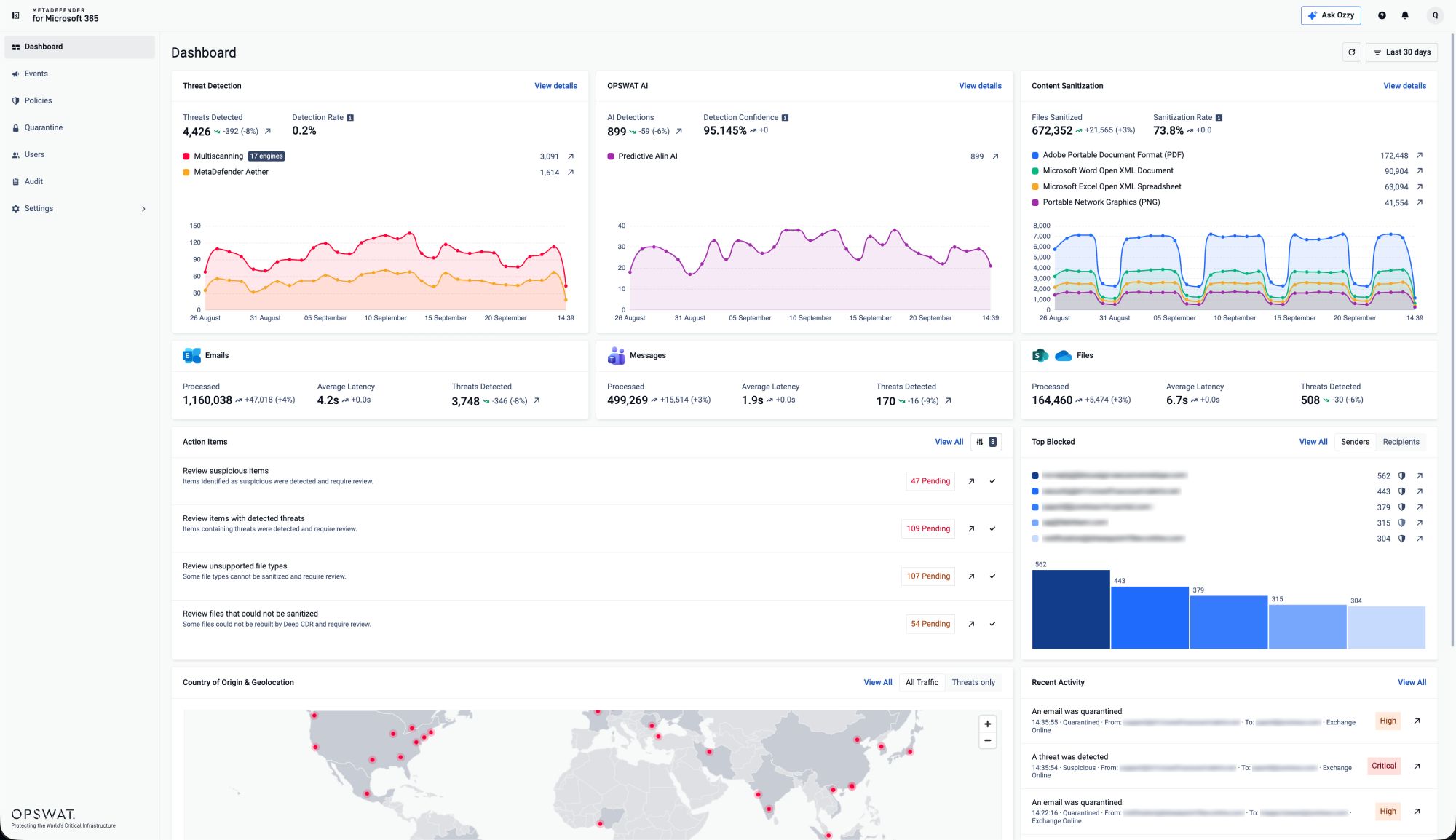
To assess where built-in protection is sufficient, and where residual file-borne risk justifies another layer, read this blog.
How Are Password-Protected Files Handled Across a Microsoft 365 Tenant?
Password-protected files create a practical security tradeoff: blocking them disrupts legitimate work but releasing them without inspection creates a blind spot. MetaDefender for Microsoft 365 gives users a self-service workflow for submitting the password securely. The file is then automatically decrypted and processed through the configured technologies, including Deep CDR™ Technology, which deconstructs the file, removes potentially malicious active content, and reconstructs a clean, functional version without routine administrator validation. If a threat is detected, the file is quarantined and user access is removed.
This self-service process preserves consistent inspection without slowing legitimate collaboration. Email attachments are inspected before delivery, while files shared through Teams or uploaded to SharePoint Online and OneDrive are scanned immediately after upload. Security and IT teams can manage protection and investigate threats from one platform without replacing established collaboration processes. For deployment guidance, read this blog.
From Email Security to Microsoft 365 File Security
MetaDefender for Microsoft 365 began by strengthening file threat prevention for Exchange Online, then extended that protection to Microsoft Teams. SharePoint Online and OneDrive coverage now follows the way files actually move across Microsoft 365 instead of treating email, messaging, and storage as isolated security surfaces.
That broader coverage addresses a common blind spot: a file that raises no alert can still be hostile. Adversaries increasingly automate reconnaissance, content generation, and repeated attack attempts, while evasive files are designed to appear routine until they execute or are weaponized later. A layered approach turns file trust into an enforceable control. Metascan™ Multiscanning detects known malware and flags new variants through heuristics and AI-powered models, Deep CDR™ Technology neutralizes potentially malicious active content, Predictive Alin AI provides rapid pre-execution analysis, and MetaDefender Aether™ exposes zero-day and evasive behavior. Together, these technologies automate file trust at Microsoft 365 scale.
Make File Trust Consistent Across Microsoft 365
If your Microsoft 365 security strategy protects the inbox but treats collaboration files as inherently trusted, the control gap follows the file into Teams, SharePoint Online, and OneDrive. Explore how MetaDefender for Microsoft 365 adds layered file threat prevention across these workflows, and where it can complement the controls already in your tenant.
Câu hỏi thường gặp (FAQ)
MetaDefender ,Cloud vàEmail Security đã xảy ra chuyện gì vậy?
MetaDefender Cloud Email Security evolved into MetaDefender for Microsoft 365 on September 29, 2026. Its cloud email security capabilities remain, while the protected surface now extends to files shared across Microsoft Teams, SharePoint Online, and OneDrive.
How do I scan SharePoint Online and OneDrive files for malware?
MetaDefender for Microsoft 365 scans files uploaded directly to SharePoint Online or OneDrive, as well as files shared through Teams. It uses up to 17 anti-malware engines, sanitizes more than 200 file types, and can deliver sandbox analysis in approximately 10 seconds. When a file is identified as malicious, it is quarantined and users can no longer access it.
What is the difference between sanitization and sandboxing?
Deep CDR™ Technology sanitization automatically removes active content and regenerates a clean, usable file without relying on detection. The Adaptive Sandbox emulates suspicious code to reveal what a file does at runtime. MetaDefender for Microsoft 365 applies both.
Does MetaDefender for Microsoft 365 replace Microsoft Defender for Office 365?
No. It works alongside native Microsoft 365 security and adds file-level depth by scanning with up to 17 anti-malware engines, sanitizing more than 200 file types, and delivering sandbox analysis in approximately 10 seconds.
Does MetaDefender for Microsoft 365 require MX record changes?
No. It integrates with Microsoft 365 with no MX record changes, no hardware, and no mail flow disruption.
Which OPSWAT product protects which surface?
MetaDefender for Microsoft 365 provides unified protection across Exchange Online, Teams, SharePoint Online, and OneDrive. For organizations whose immediate priority is protecting files stored and shared in Teams, SharePoint, and OneDrive, without email coverage, MetaDefender™ Storage Security provides a storage-focused option. For on-premises email environments, MetaDefender™ Email Gateway Security provides dedicated email protection.